2007年6月29日 星期五

2007年6月11日 星期一
Motion Vector Extraction
為了做 MULTIMEDIA ANALYSIS AND INDEXING 這門課的 project,我們這組需要從 MPEG video 裡面取出 motion vector(它在 MPEG video 裡的用途是用來做壓縮。一個物體在畫面裡面移動時,其實只需要描述它的位移,而不需整個重新 encode)。
不知道是不是因為大部分的人需要的都是 video 的 frame,而不是 motion vector(其實在解壓縮時只差一步),我 google 了好久都找不到工具可以用。後來發現 ffmpeg 的 ffplay 可以直接把 motion vector 邊撥邊畫出來,但是還是沒辦法 dump 出來。
vismv 那個參數其實是三個 bit,第一個 bit 代表 P-Frame,第二個代表 B-Frame 的 forward motion vector,第三個 bit 則是 B-Frame 的 backward vector。
不過,這只能看。所以我參考 Using libavformat and libavcodec 跟 ffplay 的 source code 寫了一個程式。這個程式可以把 video 每個 frame (除了沒有 motion vector 的 I-Frame)的 motion vector 取出來。如果要改成取第幾個 frame、或是某個 range 之類的,也很好改。
g++ compile 時需要加上 -lavcodec -lavformat 兩個參數,當然也要先裝上 libavcodec 跟 libavformat 兩個 library。有裝 ffmpeg 就會有。
http://cmlab.csie.org/~victor/archive/motion_vector.cpp
不知道是不是因為大部分的人需要的都是 video 的 frame,而不是 motion vector(其實在解壓縮時只差一步),我 google 了好久都找不到工具可以用。後來發現 ffmpeg 的 ffplay 可以直接把 motion vector 邊撥邊畫出來,但是還是沒辦法 dump 出來。
$ ffplay -vismv 3 xxx.mpgvismv 那個參數其實是三個 bit,第一個 bit 代表 P-Frame,第二個代表 B-Frame 的 forward motion vector,第三個 bit 則是 B-Frame 的 backward vector。
不過,這只能看。所以我參考 Using libavformat and libavcodec 跟 ffplay 的 source code 寫了一個程式。這個程式可以把 video 每個 frame (除了沒有 motion vector 的 I-Frame)的 motion vector 取出來。如果要改成取第幾個 frame、或是某個 range 之類的,也很好改。
g++ compile 時需要加上 -lavcodec -lavformat 兩個參數,當然也要先裝上 libavcodec 跟 libavformat 兩個 library。有裝 ffmpeg 就會有。
http://cmlab.csie.org/~victor/archive/motion_vector.cpp
2007年6月9日 星期六
Parallel::ForkManager
在 Perl 裡面如何把這種程式平行化? 假設每次 interation 是獨立的。
超簡單
foreach $data (@all_data) {
    eat_cpu($data);
}
超簡單
use Parallel::ForkManager; # !!
$pm = new Parallel::ForkManager($MAX_PROCESSES);

foreach $data (@all_data) {
    $pid = $pm->start and next;
    eat_cpu($data);
    $pm->finish;
}
2007年5月22日 星期二
google suggest
下午用 google suggest 試打一個字母,想看看第一筆會是什麼。背 26 個英文字母,以前是 a for apple, b for banana,現在是不是可以改成 a for asus, b for bt XD
在非個人化的搜尋時,這些是目前只按 a, b, ..., z 時的結果
asus bt canon dictionary emule foxy gmail hinet ikea kkbox lv msn nokia openoffice pchome qq realplayer skype tvb urmap vista wii xuite yahoo zara
1 ... 9, 0 的結果
104 2000fun 300 400d 5566 6300 7-11 8591 9mil 007
.(點) 跟 _(底線) 的結果
.net framework _desktop.ini
很多數字的結果真是沒什麼意義 XD
在非個人化的搜尋時,這些是目前只按 a, b, ..., z 時的結果
asus bt canon dictionary emule foxy gmail hinet ikea kkbox lv msn nokia openoffice pchome qq realplayer skype tvb urmap vista wii xuite yahoo zara
1 ... 9, 0 的結果
104 2000fun 300 400d 5566 6300 7-11 8591 9mil 007
.(點) 跟 _(底線) 的結果
.net framework _desktop.ini
很多數字的結果真是沒什麼意義 XD
2007年5月7日 星期一
geotagged photos
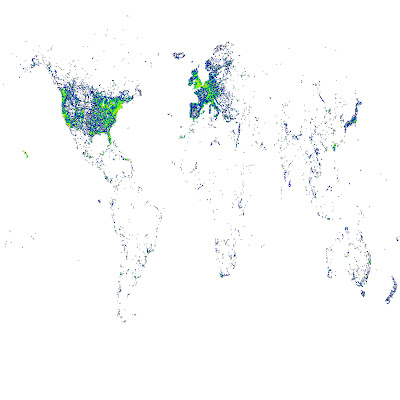
現在有很多相機有內建 GPS,每次照相時相片的 EXIF 會多記錄拍照地點的經緯度。之前我們從 flickr 收集了大量 geotagged 也就是有經緯座標的照片,從中找出所謂的「地標」,並讓電腦記得這些地標長什麼樣子。接著如果有一天,有一張新照片進來(可能是沒有 geotag),系統可以自動認出這張照片是那個地標,甚至這個地標在那個城市、那個國家。這中間牽扯到怎麼從照片認照片、ontology tree 的建立等等問題,不過這並不是我想說的重點。在這個過程中,我畫了一些圖,想跟大家分享一些比較有趣的:
這是把我們 mirror 來的資料按經緯度畫出來,顏色越偏紅表示照片數越多(指數成長)
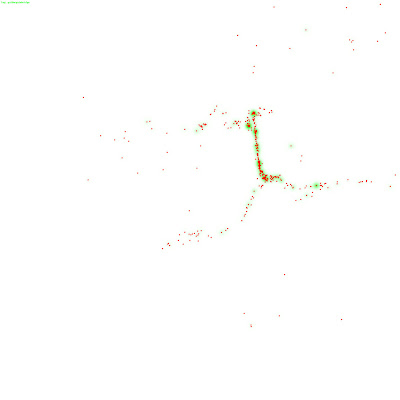
這是舊金山金門大橋 :D 對照空照圖
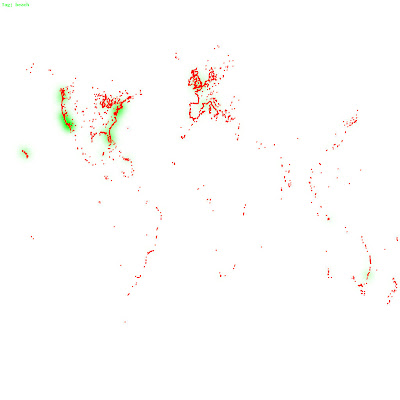
這是那些照片中,有被標上「beach」的
這是把我們 mirror 來的資料按經緯度畫出來,顏色越偏紅表示照片數越多(指數成長)
這是舊金山金門大橋 :D 對照空照圖
這是那些照片中,有被標上「beach」的
2007年4月16日 星期一
2007年3月30日 星期五
post code visualization
http://eagereyes.org/topics/ZIPScribbleMaps 這個人把郵遞區號座標(來源是 Geonames)拿來畫在地圖上,按照號碼的順序連在一起,結果畫出來的圖還滿有趣的。雖然說各國當初在設計郵遞區號應該就是照著地區排,但是看到畫出來的圖,美國洲跟洲的邊界真的跟行政區很符合,真的很有趣 :p
BTW, Geonames 提供很多地理方面資訊,還有 API 可以用。
BTW, Geonames 提供很多地理方面資訊,還有 API 可以用。
訂閱:
文章 (Atom)